
GCSE Combined Science (AQA)
622 videos | 38 hours
Please subscribe to watch this video.
This, and all other videos, are included in our premium subscriptions.
Premium accounts get access to all videos.
Enable autoplay to keep watching
Your browser is blocking videos from playing automatically. To turn it back on:
Safari (Mac): Click the Safari menu item in the top bar, then Settings → Websites → Auto-Play, then set Auto-Play to Allow All Auto-Play for the current website.
Safari (iPhone/iPad): open the Settings app, then Apps → Safari → Auto-Play, and select Allow All Auto-Play.
Standard Form on a Calculator
- Use a calculator to convert numbers into standard form with a specific number of significant figures.
- This conversion is done using a scientific calculator, which is often required in exam settings.
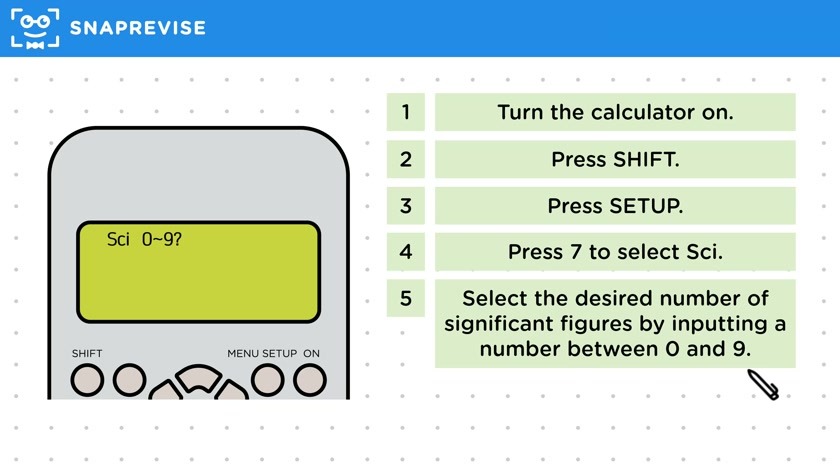
- Steps to set the calculator for standard form:
- Turn on the calculator and press "shift."
- Press "set up."
- Press "seven" to select "si."
- Choose the number of significant figures (between zero and nine), typically two or three.
- Enter the number and press "equals" to display it in standard form.
- To reset the calculator to stop displaying numbers in standard form:
- Access the setup menu again.
- Press "shift" and then "set up."
- Press "eight" to select "Norm."
- Select "two" to reset the calculator to normal display mode.
Please subscribe to access these revision notes.
This, and all other video notes, are included in our premium subscriptions.
Premium accounts get access to all videos and revision notes.
135
questions for Cell Biology
17
questions for Cell Structure